
2D Sketching with the Sketcher
For shapes you can't build from primitive booleans (anything with a non-rectangular profile, anything tapered, anything organic-mechanical) you sketch in 2D and extrude into 3D. brepjs ships two ways to do this: the Sketcher builder (for arbitrary profiles) and the canned shape builders (sketchCircle, sketchRoundedRectangle, etc., for common ones).
The two-step model
Sketcher / sketchCircle / drawRectangle  →  Sketch (a face on a plane)
                                          ↓
                                       extrude / revolve / loft / sweep
                                          ↓
                                        Solid
A sketch is a planar face. From a face you build a solid by extruding (linear), revolving (around an axis), lofting (between profiles), or sweeping (along a path).
Canned profiles
For common cross-sections, use the builder functions; they return a sketch with .extrude directly:
import {
  sketchCircle,
  sketchRectangle,
  sketchRoundedRectangle,
  measureVolume,
  unwrap,
} from 'brepjs/quick';

const cyl = sketchCircle(10).extrude(20); // R=10, H=20
const block = sketchRectangle(30, 20).extrude(10);
const softBlock = sketchRoundedRectangle(30, 20, 3).extrude(10);

console.log('Cylinder volume:', unwrap(measureVolume(cyl)).toFixed(2));
console.log('Soft block volume:', unwrap(measureVolume(softBlock)).toFixed(2));

export default softBlock;
All canned sketches default to the XY plane. Pass a plane config as the last argument: sketchCircle(10, { plane: 'YZ' }).extrude(20).
The Sketcher builder
For arbitrary profiles, build the wire path step by step:
import { Sketcher, measureVolume, unwrap } from 'brepjs/quick';

const profile = new Sketcher('XY')
  .movePointerTo([0, 0])
  .lineTo([20, 0])
  .lineTo([20, 10])
  .lineTo([15, 10])
  .lineTo([15, 5])
  .lineTo([5, 5])
  .lineTo([5, 10])
  .lineTo([0, 10])
  .close();

const part = profile.extrude(8);
console.log('Notched plate volume:', unwrap(measureVolume(part)));

export default part;
A C-shaped profile, eight straight segments, closed back to the start, extruded 8 mm. The Sketcher tracks the current "pointer" position; every lineTo / arcTo extends from the pointer.
The full Sketcher vocabulary
| Method | Purpose |
|---|---|
movePointerTo([x, y]) | Set start position without drawing |
lineTo([x, y]) | Absolute line |
line(dx, dy) | Relative line |
hLine(d) / vLine(d) | Horizontal / vertical relative line |
hLineTo(x) / vLineTo(y) | Horizontal / vertical absolute |
polarLine(distance, angleDeg) | Polar relative line |
tangentLine(distance) | Continue tangent to last segment |
threePointsArcTo(end, viaPoint) | Arc through a point |
tangentArcTo([x, y]) | Tangent arc to absolute point |
tangentArc(dx, dy) | Tangent arc relative |
sagittaArcTo([x, y], sagitta) | Arc with given chord-height |
bulgeArcTo([x, y], bulge) | Arc with bulge factor (DXF convention) |
ellipseTo([x, y], hR, vR, rot?, longAxis?, sweep?) | Elliptical arc |
close() | Close back to start |
closeWithMirror() | Close with mirrored copy of segments so far |
After close(), you have a Sketch (a closed wire on its plane) ready to extrude / revolve / loft / sweep.
Tangent arcs are the workhorse
Most curved profiles in mechanical CAD use tangent arcs: the arc continues smoothly from the previous segment without a corner:
import { Sketcher } from 'brepjs/quick';

const cammedShape = new Sketcher('XY')
  .movePointerTo([0, 0])
  .hLine(20)
  .tangentArc(5, 5) // smooth quarter-arc upward
  .vLine(10)
  .tangentArc(-5, 5) // smooth quarter-arc to flat
  .hLine(-20)
  .close()
  .extrude(5);

export default cammedShape;
tangentArc(dx, dy) builds the arc that meets the previous segment tangentially and ends at the relative offset. Smooth curves with no math.
Revolves
A profile rotated around an axis. The axis must be in the sketch plane, on one side of the profile (the profile cannot cross it):
import { Sketcher } from 'brepjs/quick';

const wineGlass = new Sketcher('XZ')
  .movePointerTo([0, 0])
  .hLine(8) // base radius
  .vLine(2)
  .hLine(-6)
  .vLine(20) // stem
  .hLine(15)
  .tangentArc(0, 4) // bowl
  .hLine(-17)
  .vLine(-26)
  .close()
  .revolve(); // around Z by default

export default wineGlass;
The default axis is world Z ([0, 0, 1]) through the sketch origin, whatever the plane. Pass another direction to override it: revolve([0, 1, 0]).
Lofts
A solid that smoothly interpolates between two or more sketches. The sketches must be in different planes (parallel or angled):
import { sketchCircle, loft, unwrap } from 'brepjs/quick';

const profile1 = sketchCircle(10);
const profile2 = sketchCircle(20, { origin: 30 }); // XY plane at z=30
const profile3 = sketchCircle(5, { origin: 60 });

const tapered = unwrap(loft([profile1.wire, profile2.wire, profile3.wire]));

export default tapered;
The loft passes through every input sketch in order. Useful for ducts, transitions, organic-looking parts.
Sweeps
A profile dragged along a path:
import { sketchCircle, line, wire, sweep, unwrap } from 'brepjs/quick';

const cross = sketchCircle(2); // 2mm radius, on XY
const path = unwrap(wire([line([0, 0, 0], [0, 0, 50])])); // 50mm straight, along Z

const rod = unwrap(sweep(cross.wire, path));

export default rod;
The path can be any wire: straight, arced, helical. Common pattern: revolve + sweep produces threaded rods, tubing, springs.
The Drawing API: 2D booleans before extrude
When your 2D profile needs booleans (cut a circle from a rectangle, fillet a 2D corner), use drawRectangle / drawCircle and the drawing* operations before projecting to a plane:
import {
  drawRectangle,
  drawCircle,
  drawingCut,
  drawingFillet,
  drawingToSketchOnPlane,
} from 'brepjs/quick';

const plate = drawRectangle(50, 30); // centred on the origin
const hole = drawCircle(8); // also centred, so it lands mid-plate
const profile = drawingCut(plate, hole);
const rounded = drawingFillet(profile, 3);

const sketch = drawingToSketchOnPlane(rounded, 'XY');
const part = sketch.extrude(10);
console.log('Built drawing → sketch → solid');

export default part;
drawing* operations work on Drawing values; drawingToSketchOnPlane converts to a Sketch projected onto the named plane.
For most profiles the Sketcher is simpler. Use the Drawing API when you need 2D booleans (the canonical case: a plate with multiple holes that share complex geometry).
Sketching on existing faces
You don't have to sketch on the world planes; you can sketch on any face of an existing shape:
import { box, faceFinder, faceCenter, FaceSketcher, fuse, unwrap } from 'brepjs/quick';

const base = box(40, 40, 10);
const topFace = faceFinder()
  .when((f) => faceCenter(f)[2] > 5)
  .findAll(base)[0];
if (!topFace) throw new Error('No top face');

// FaceSketcher coordinates run from 0 to 1 across the face
const boss = new FaceSketcher(topFace)
  .movePointerTo([0.25, 0.25])
  .lineTo([0.75, 0.25])
  .lineTo([0.75, 0.75])
  .lineTo([0.25, 0.75])
  .close()
  .extrude(5, { extrusionDirection: [0, 0, 1] });

const part = unwrap(fuse(base, boss));
console.log('Built feature on top face');

export default part;
The Sketcher constructor accepts a plane name ('XY') or a Plane; to sketch on a face, use FaceSketcher. Its coordinates are normalised across that face's surface (0 to 1 in each direction).
Tips
Close every sketch before extruding
extrude requires a closed wire (it has type OrientedFace, which requires ClosedWire). Forgetting .close() is the most common Sketcher mistake. The compiler does not catch it: .done() also returns a Sketch with .extrude.
Don't intersect with yourself
A self-intersecting wire produces an invalid face. The kernel will catch it and return an error, but the diagnosis is not always obvious. Plot your sketch points on paper if you're unsure.
Use the canned shapes when possible
sketchCircle(10) is much better than building a circle from four arcs: fewer kernel calls, better tolerance, no chance of an open wire.
Examples
These playground examples draw a 2D profile from lines and arcs, then extrude or revolve it.
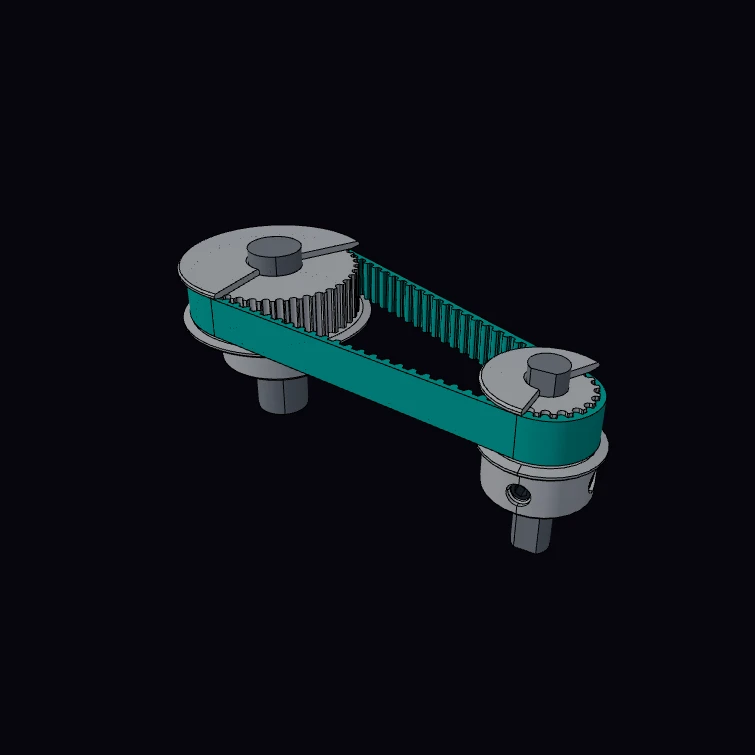 GT2 Timing Pulley and BeltA 20-tooth GT2 pulley on a closed 80-tooth belt that drives a 40-tooth pulley. The 2 mm pitch, the pitch-line offset and the three-arc groove form are published figures. The kernel measures the pitch line, which must equal the belt length. The flanges, the hubs, the set screws and the shafts are a display model.
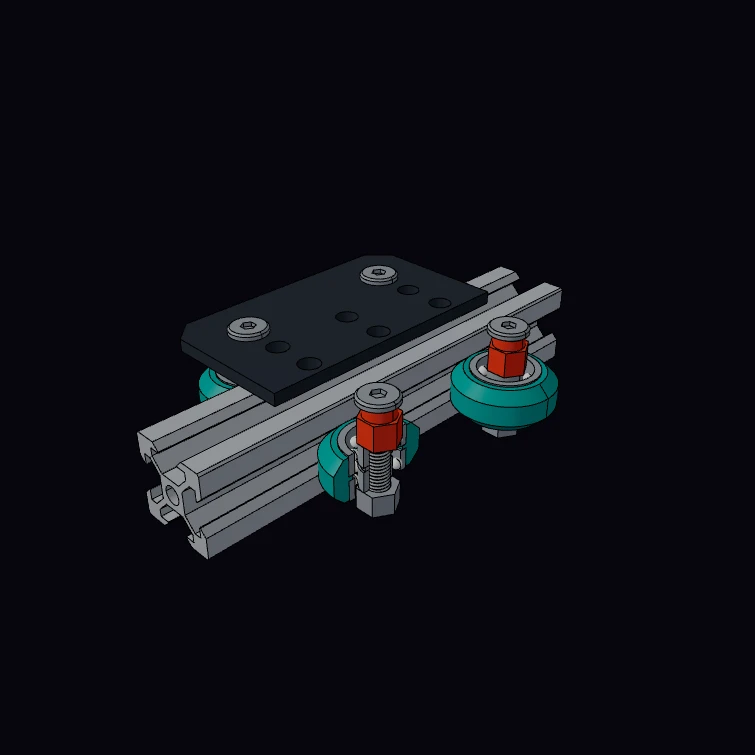 V-Groove Slider Rail and CarriageA 20 x 20 slotted rail with a carriage on four V-wheels, one wheel in cutaway. The rail size and mass, the wheel, the 625 bearings, the eccentric spacers, the plate size and the M5 thread are published figures. Each M5 screw is a true helix in the mating thread of its lock nut. The kernel measures the rail mass for each metre from its section. The inside of the slots, the wheel tip, the ball sets and the hole pattern are a display model.
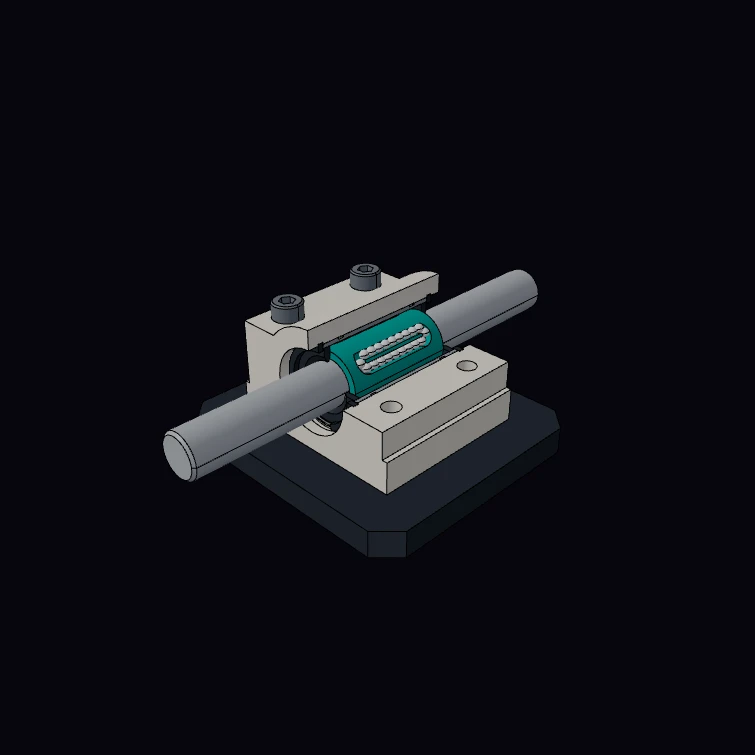 Linear Bearing Pillow Block (cutaway)A pillow block of the 8 mm class with its linear ball bushing on a shaft, in cutaway. The block and the bushing dimensions, the four ball rows, the mass and the M3 and M4 threads are published figures. The M3 cap screws are true helical screws in the tapped holes of the plate. The kernel measures the mass of the unit and of the bushing from the volumes. The ball circuits, the retainer, the seals, the snap rings and the plate are a display model.
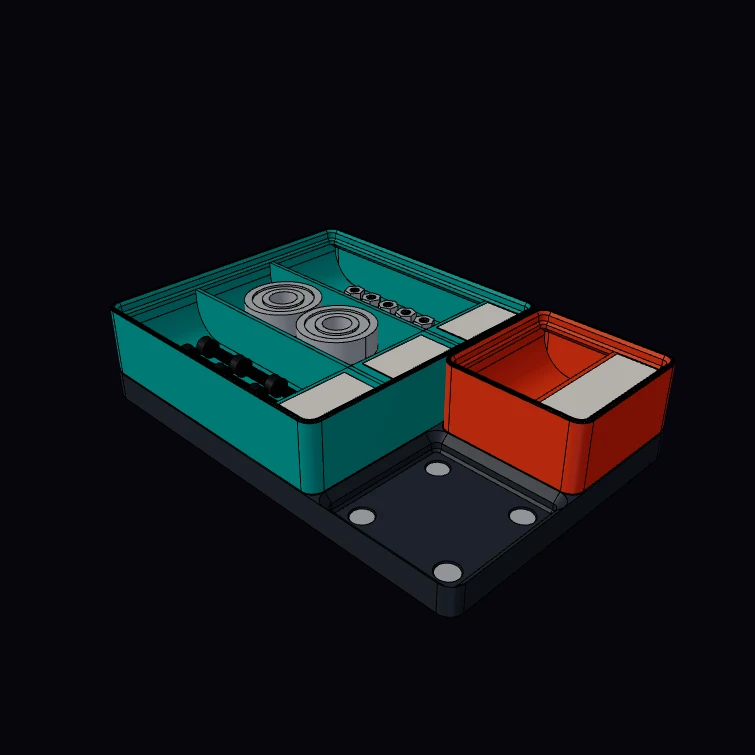 Gridfinity BinA Gridfinity bin with dividers, label tabs and a scoop, on a section of magnet baseplate with a second bin and one free socket. The 42 mm grid, the 7 mm height unit, the foot, socket and stacking lip profiles, the magnet and screw holes and the M3 thread are published figures. The loose screws and nuts in the bays have true helical threads. The kernel measures the size of the bin and its plastic volume. The walls, the tabs, the scoop, the labels and the hardware in the bays are a display model.
Next steps
- Lofts, Sweeps, Revolves: going from sketch to solid by means other than extrude
- Finders & Queries: picking specific edges of a sketched part to refine
- Boolean Operations: combining sketched solids