
Sheet Metal
brepjs-sheetmetal is a sheet-metal layer on brepjs. You describe a part as a flat base and the flanges that fold from its edges. The package folds that description to a 3D solid, and it unfolds the same description to the flat blank that a shop cuts and bends.
npm install brepjs-sheetmetal brepjs occt-wasmThe package builds its shapes with brepjs, so a kernel must be ready before the first call. Install & Initialize shows how.
The package is experimental, so its API can change between minor versions.
A first part
This is a U-channel: an 80 × 50 mm base of 2 mm sheet, with a 30 mm flange on each short edge and one hole in the base.
import { unwrap } from 'brepjs';
import { author, addHole, unfold, toDXF } from 'brepjs-sheetmetal';

const rule = { innerRadius: 2, kFactor: 0.44 };

const channel = unwrap(
  author({
    thickness: 2,
    base: { length: 80, width: 50 },
    flanges: [
      { id: 'left', side: 'xmin', length: 30, angleDeg: 90, rule },
      { id: 'right', side: 'xmax', length: 30, angleDeg: 90, rule },
    ],
  })
);

// A 6 mm hole at (40, 25) in the frame of the base.
const part = unwrap(addHole(channel, 'base', 40, 25, 6));

const { pattern, report, warnings } = unwrap(unfold(part));
const dxf = unwrap(toDXF(pattern));

const [blankLength, blankWidth] = report.totalFlatSize;
if (Math.abs(blankLength - 149.048) > 0.001 || blankWidth !== 50) throw new Error('blank size');
if (Math.abs((report.bends[0]?.allowance ?? 0) - 4.524) > 0.001) throw new Error('allowance');
if (pattern.bendLines.length !== 2 || pattern.holes.length !== 1) throw new Error('pattern');
if (warnings.length !== 0) throw new Error('warnings');
for (const layer of ['OUTLINE', 'BEND_UP', 'CUTOUT']) {
  if (!dxf.includes(layer)) throw new Error(`no ${layer} layer`);
}

// The solids and the pattern geometry are kernel objects. Free them when you are done.
const bendEdges = pattern.bendLines.map((bend) => bend.line);
for (const shape of [channel.solid, part.solid, pattern.outline, ...pattern.holes, ...bendEdges]) {
  shape?.delete();
}
Each call returns a Result, so unwrap throws on a spec that cannot be built. The folded solid is part.solid, an ordinary brepjs solid that you can measure, cut, or export to STEP.
What the unfold gives you
unfold(part) returns three things.
patternis the flat blank as geometry: the outline wire, one edge for each bend line, and one closed wire for each cutout.toDXF(pattern)writes it as a DXF with the layersOUTLINE,BEND_UPandCUTOUT.reportis the bend report. For the channel above it lists two 90° bends with an allowance of 4.524 mm each, and a blank of 149.048 × 50 mm.warningsnames what the unfold could not do cleanly, such as a bend with an inner radius below one thickness, or a closed profile that needs a seam. The channel has none.
The unfold does not look for flanges that collide. validate(part) does that check on the folded part, and it returns the same kind of warning list.
The blank length shows the bend model at work. The base is 80 mm, each flange adds 30 mm, and each bend adds its allowance: 80 + 2 × 30 + 2 × 4.524 = 149.048 mm.
The bend model
The allowance of a bend comes from the K-factor formula:
BA = (π / 180) × angle × (R + K × T)R is the inner radius, T is the thickness, and K is the K-factor. For the channel, (π / 180) × 90 × (2 + 0.44 × 2) is 4.524 mm. A part can refer to a shop bend table in place of the formula, for a press brake with measured values.
Features
The package has more features than this page shows. Each one is recorded on the part, so it is in the folded solid. Most are in the flat pattern too. A corner miter is an exception: the unfold draws its chamfer only for some flange layouts. Beside a tab it leaves the chamfer out and gives a MITER_NOT_DEVELOPED warning. Compare the blank with the folded part before you cut it.
- Flanges on each of the four base edges, flanges on flanges, and partial flanges.
- Corner miters, bend reliefs and corner reliefs.
- Holes, slots and polygon cutouts on the base or on a flange.
- Tabs, tab-and-slot joints, louvers, embosses and dimples.
- Hems, jogs, contour flanges and lofted flanges.
- Nesting of blanks on stock sheets, and unfolding of an imported solid.
The package README has the full reference for each feature.
Examples
These playground examples fold a part, show its flat blank beside it, and give the DXF as a download.
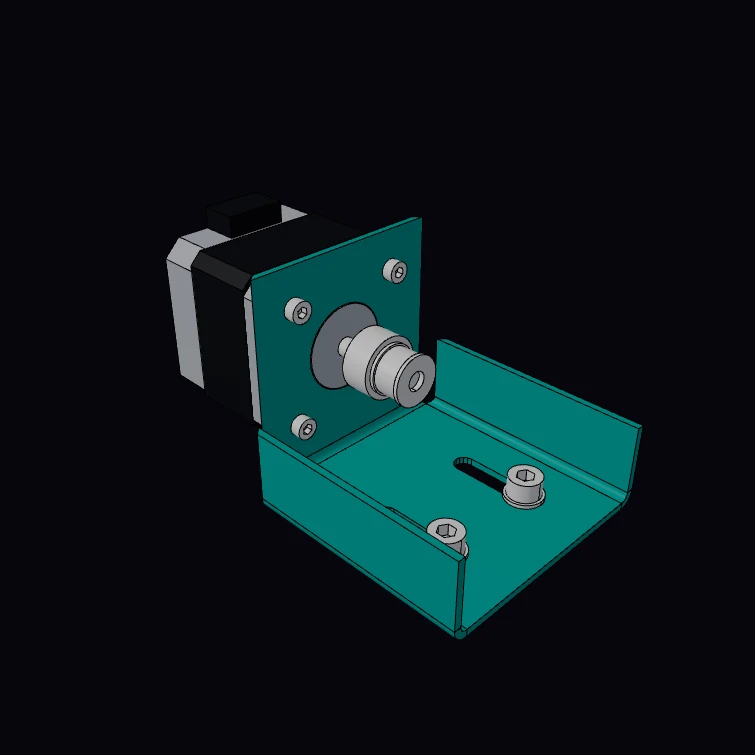 Mitered Motor BracketA mounting bracket for a NEMA 17 stepper motor, folded from one blank of 14 gauge steel: a face and two ribs fold up from the base, and each rib meets the face in a mitered corner. The gauge, the motor face, its hole pattern, its shaft and the screw threads are published figures. The M3 screws turn into the tapped holes of the motor and the M5 screws into nuts, with true helical threads. The kernel unfolds the bracket to the flat blank, with the bend allowance, and measures the mass. The motor and the pulley are a display model. The DXF button downloads the flat blank.
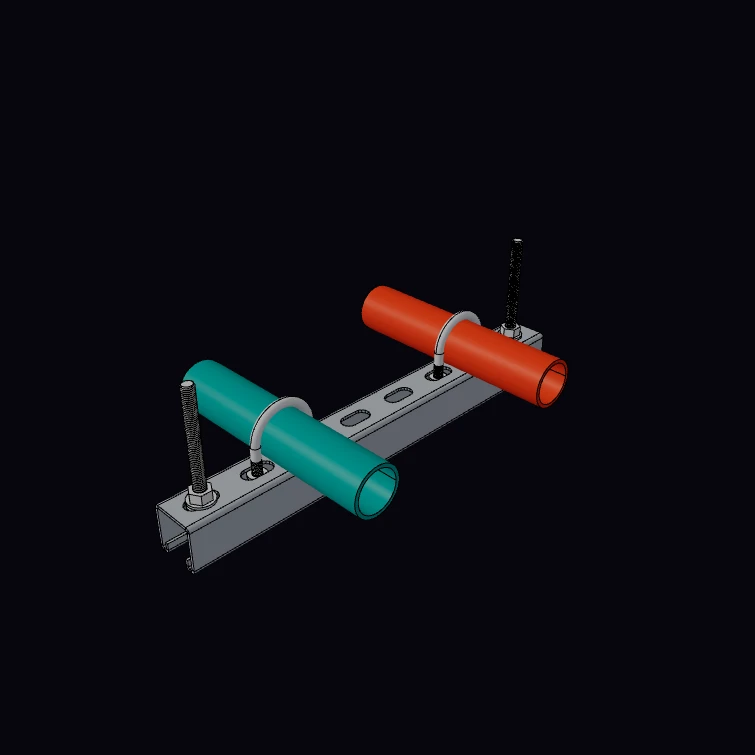 Slotted Strut ChannelA slotted strut channel, folded from one strip with six bends, as a trapeze hanger: two threaded rods carry it and two U-bolts hold a pipe each. The 41 mm section, the 2.5 mm gauge, the 14 x 28 mm slots at 50 mm, the mass for each metre and the M10 and M8 threads are published figures. The rods and the legs of the U-bolts have true helical threads, and each nut has the mating thread. The kernel unfolds the section to the flat strip and measures the mass. The lips, the pipes and the hardware are a display model. The DXF button downloads the flat strip.
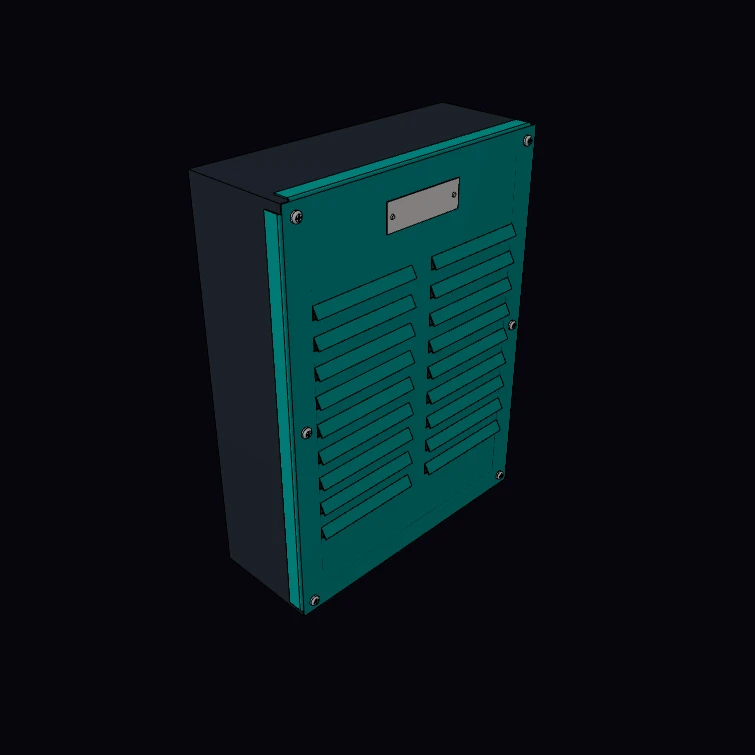 Louvered Enclosure CoverThe louvered cover of an equipment enclosure, from 20 gauge steel, with its screws, a name plate and the enclosure behind it. Each louver is a cut on three sides with the flap formed out along the fourth side, so the flat blank keeps all its material. The gauge and the screw threads are published figures. The M4 screws and the cable glands have true helical threads in tapped holes. The kernel unfolds the cover to the flat blank and measures its mass. The size, the louvers, the enclosure and the hardware are a display model. The DXF button downloads the flat blank.
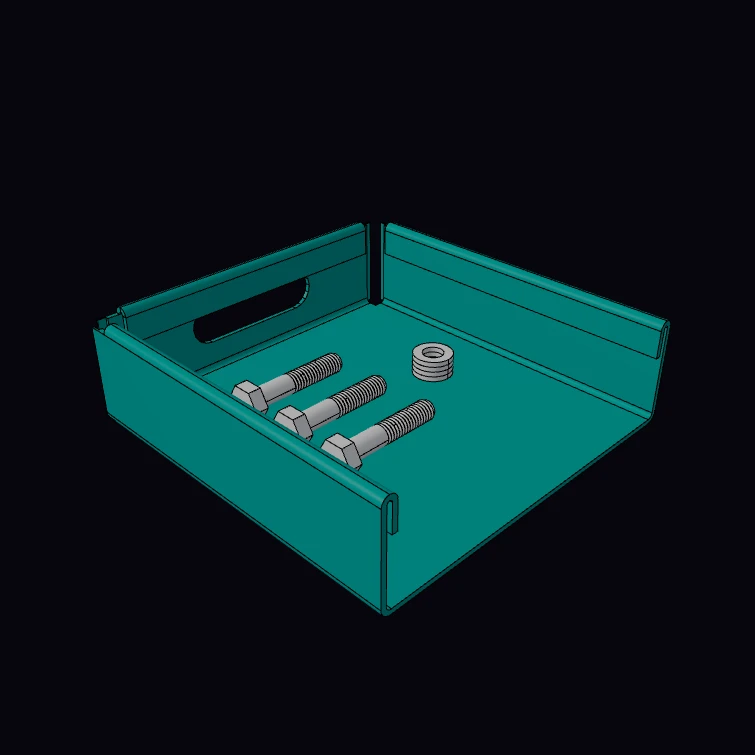 Hemmed Parts TrayA parts tray from 16 gauge steel with a hemmed safe edge, in cutaway: the top of each wall folds back on itself, and the cut shows the section of two hems. Set the type of the hem to closed, open, teardrop or rolled. The gauge and the M6 bolts with their helical thread are published figures. The kernel gives the sheet that one hem takes, unfolds the tray to the flat blank and measures its mass. The size, the handles, the feet and the hardware in the tray are a display model. The DXF button downloads the flat blank.
Next steps
- Import & Export: STEP, STL and glTF for the folded solid
- Measurement: mass and area of a part
- Result and Errors: what
unwrapdoes and when to useisOk