
Import & Export
brepjs reads and writes the formats every CAD pipeline expects. STEP and IGES preserve B-Rep structure for round-tripping with desktop CAD. STL, glTF, OBJ, and 3MF carry meshes for 3D printing and rendering. DXF and SVG carry 2D for laser cutting and signage. BREP is OpenCascade's native format. The 3D imports return Result<Shape, BrepError>; STEP, IGES, and STL exports return Result<Blob, BrepError>, while the mesh exporters (glTF, OBJ, 3MF) take a mesh() result and return the file contents directly.
Format support
| Format | Read | Write | Use case |
|---|---|---|---|
| STEP (.step, .stp) | ✓ | ✓ | Industry-standard B-Rep round-trip |
| IGES (.igs, .iges) | ✓* | ✓* | Older B-Rep round-trip; STEP preferred |
| BREP (.brep) | ✓ | ✓ | OpenCascade-native; smallest, fastest |
| STL (.stl) | ✓ | ✓ | 3D printing, mesh-only |
| OBJ (.obj) | ✓ | ✓ | Mesh export for renderers |
| glTF (.glb / .gltf) | - | ✓ | Web-friendly mesh |
| 3MF (.3mf) | ✓ | ✓ | Modern 3D printing format with metadata |
| DXF (.dxf) | ✓ | ✓ | 2D laser cutting |
| SVG (.svg) | ✓ | ✓ | 2D for the web / signage |
* IGES needs a kernel built with an IGES translator. The default occt-wasm kernel has none, so there importIGES and exportIGES return an UNSUPPORTED_CAPABILITY error; exchange the model as STEP instead.
STL import lossily converts triangles into a B-Rep approximation, useful for STEP conversion and measurement, not for further B-Rep work. A closed mesh imports as a Solid with one planar face per triangle; an open mesh imports as a sewn Shell, and a file with several bodies imports as a Compound of them. Because every triangle becomes a face, large meshes take seconds. On the default occt-wasm kernel, a watertight mesh whose triangles wind consistently takes roughly 0.3 seconds per 10,000 triangles (about 1.7 seconds for 50,000). A mesh whose winding needs repair takes roughly 2 seconds per 10,000 (about 13 seconds for 50,000), and up to about twice that for a file with several bodies.
Export
The STEP, STL, and IGES exporters take a shape and return Result<Blob, BrepError>. The mesh exporters take a mesh() result:
import { box, mesh, exportSTEP, exportSTL, exportGltf, unwrap } from 'brepjs/quick';

const part = box(30, 20, 10);

const step = unwrap(exportSTEP(part)); // Blob: STEP file
const stl = unwrap(exportSTL(part, { tolerance: 0.1 }));
const gltf = exportGltf(mesh(part, { tolerance: 0.1 })); // string: glTF JSON

console.log('STEP:', step.size, 'bytes');
console.log('STL:', stl.size, 'bytes');
console.log('glTF:', gltf.length, 'chars');

export default part;
STEP: the round-trip format
STEP (ISO 10303) preserves B-Rep structure: faces, edges, surfaces, curves, even sharp/smooth qualifiers. A part written with exportSTEP and re-imported with importSTEP is geometrically identical (within tolerance):
import { box, exportSTEP, importSTEP, isShape3D, measureVolume, unwrap } from 'brepjs/quick';

const original = box(30, 20, 10);
const step = unwrap(exportSTEP(original));
const reimported = unwrap(await importSTEP(step));
// importSTEP can return any shape kind; measureVolume needs a 3D one
if (!isShape3D(reimported)) throw new Error('STEP file holds no solid');

console.log('Original volume:', unwrap(measureVolume(original))); // 6000
console.log('Reimported volume:', unwrap(measureVolume(reimported))); // 6000 ± epsilon
Use STEP for any pipeline that involves desktop CAD: Fusion 360, SolidWorks, FreeCAD, OnShape, Rhino.
STL: the printing format
STL is the universal 3D-printing format. brepjs's exportSTL triangulates the B-Rep at a configurable tolerance:
import { box, cylinder, exportSTL, unwrap } from 'brepjs/quick';

const part = box(30, 20, 10);
const printable = unwrap(
  exportSTL(part, {
    tolerance: 0.05, // mesh deviation in mm; smaller = more triangles
    angularTolerance: 0.5, // max angle between adjacent face normals (rad)
  })
);
void printable;

export default part;
The defaults are tuned for screen-size rendering. For 3D printing, set tolerance to roughly one-tenth your printer's nozzle diameter (so for a 0.4 mm nozzle, ~0.04 mm).
glTF: the web-friendly format
glTF (.glb is binary glTF) carries triangles plus optional materials and normals, designed for the web, smaller than STL, viewable in browsers natively:
import { box, mesh, exportGlb } from 'brepjs/quick';

const part = box(30, 20, 10);
const glb = exportGlb(mesh(part, { tolerance: 0.1 })); // ArrayBuffer: binary .glb
void glb;

export default part;
Use this for "ship the model to the user's browser": they can open it directly in <model-viewer> or load it into Three.js.
3MF: the modern printing format
3MF carries the same triangles as STL but adds metadata (units, slicer hints, multiple parts, colour). Modern slicers prefer it:
import { box, mesh, exportThreeMF } from 'brepjs/quick';

const part = box(30, 20, 10);
const threeMF = exportThreeMF(mesh(part, { tolerance: 0.05 })); // ArrayBuffer
void threeMF;

export default part;
DXF / SVG: 2D export
For laser cutting and signage, project a 3D part to a 2D drawing:
import { blueprintToDXF } from 'brepjs/quick';

declare const part: import('brepjs').Drawing;

const svg = part.toSVG(); // string, for the web
const dxf = blueprintToDXF(part.blueprint); // string, for laser
void svg;
void dxf;
Both work on Drawing values, typically the output of a draw() chain or a 3D part projected to 2D with drawProjection.
Import
Most imports are async because they parse the file contents:
import { importSTEP, importIGES, fromBREP, importSTL, unwrap } from 'brepjs/quick';

declare const stepBlob: Blob;
declare const igesBlob: Blob;
declare const brepText: string;
declare const stlBlob: Blob;

const fromStep = unwrap(await importSTEP(stepBlob));
const fromIges = unwrap(await importIGES(igesBlob));
const fromBrep = unwrap(fromBREP(brepText)); // sync; takes the BREP text (toBREP writes it)
const fromStl = unwrap(await importSTL(stlBlob)); // converts triangles → B-Rep approximation

void fromStep;
void fromIges;
void fromBrep;
void fromStl;
All imports return Result<Shape, BrepError>. Failures during import almost always mean the file is malformed or in a dialect the kernel doesn't recognize.
A STEP or IGES file holding one solid imports as that Solid. An assembly, or any file with several parts, imports as a Compound of every part, each at the placement the file gives it; getSolids lists the parts. Part names and colors in the file are not read.
Always heal imported shapes
Imports (especially STEP from third-party tools) often have minor invalidity: gaps between faces, edges with the wrong precision, vertices that don't quite match. Always heal before operating on imported shapes:
import { importSTEP, autoHeal, unwrap } from 'brepjs/quick';

declare const stepBlob: Blob;

const raw = unwrap(await importSTEP(stepBlob));
const ready = unwrap(autoHeal(raw)).shape; // autoHeal returns { shape, report }
// Now ready is a healed shape suitable for booleans, fillets, etc.
void ready;
Without healing, the first boolean against an imported shape is likely to fail. See Healing & Sewing.
Saving and loading
Browser: save via download
import { box, exportSTEP, unwrap } from 'brepjs/quick';

const blob = unwrap(exportSTEP(box(10, 10, 10)));
const url = URL.createObjectURL(blob);
const a = document.createElement('a');
a.href = url;
a.download = 'part.step';
a.click();
URL.revokeObjectURL(url);
Browser: load via file input
import { importSTEP, autoHeal, unwrap } from 'brepjs/quick';

declare const fileInput: HTMLInputElement;
const file = fileInput.files?.[0];
if (file) {
  const shape = unwrap(await importSTEP(file));
  const healed = unwrap(autoHeal(shape)).shape;
  void healed;
}
File is a Blob subtype; every import* that takes a Blob accepts both (importSVG takes the SVG text instead).
Node: read/write disk
import { readFileSync, writeFileSync } from 'node:fs';
import { box, importSTEP, exportSTEP, autoHeal, unwrap } from 'brepjs/quick';

// Write
const blob = unwrap(exportSTEP(box(10, 10, 10)));
writeFileSync('part.step', new Uint8Array(await blob.arrayBuffer()));

// Read
const data = readFileSync('input.step');
const inputBlob = new Blob([data]);
const shape = unwrap(await importSTEP(inputBlob));
const ready = unwrap(autoHeal(shape)).shape;
void ready;
Blob constructor accepts BufferSource (which Uint8Array and Node Buffer are).
Round-trip patterns
STEP → STL conversion
A common pipeline: receive STEP from a designer, convert to STL for printing.
import { importSTEP, exportSTL, autoHeal, unwrap } from 'brepjs/quick';

declare const stepBlob: Blob;

const imported = unwrap(await importSTEP(stepBlob));
const healed = unwrap(autoHeal(imported)).shape;
const stl = unwrap(exportSTL(healed, { tolerance: 0.05 }));
void stl;
STL → STEP (best-effort)
Reverse direction is lossy: STL is triangles, STEP wants surfaces. brepjs converts triangles to a B-Rep approximation:
import { importSTL, exportSTEP, autoHeal, unwrap } from 'brepjs/quick';

declare const stlBlob: Blob;

const triangles = unwrap(await importSTL(stlBlob));
const healed = unwrap(autoHeal(triangles)).shape;
const step = unwrap(exportSTEP(healed));
void step;
The result is a STEP file with one face per input triangle. Acceptable for low-resolution conversion; not a substitute for proper B-Rep authoring.
What can go wrong
| Failure | Cause |
|---|---|
STEP_IMPORT_FAILED / IGES_IMPORT_FAILED / STL_IMPORT_FAILED | The file is malformed, has no geometry, or is in an unsupported dialect |
STEP_EXPORT_FAILED / STL_EXPORT_FAILED / IGES_EXPORT_FAILED | The kernel's writer rejected the shape |
STEP_EXPORT_CRASHED / STL_EXPORT_CRASHED | The shape contains geometry the writer cannot serialize |
UNSUPPORTED_CAPABILITY from importIGES / exportIGES | The active kernel has no IGES translator (the default occt-wasm kernel); use STEP |
Examples
These playground examples write a file that you can download: a DXF flat pattern or an IFC model.
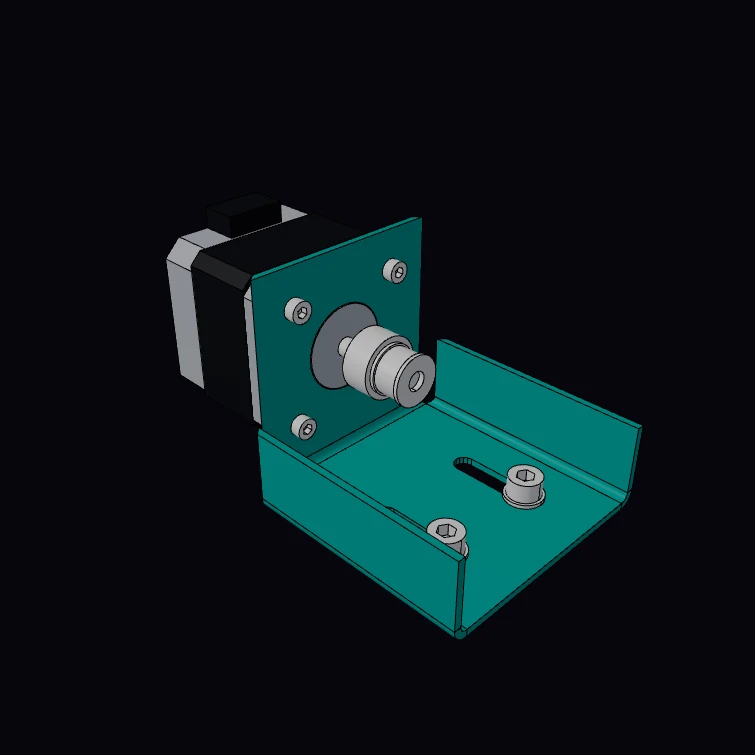 Mitered Motor BracketA mounting bracket for a NEMA 17 stepper motor, folded from one blank of 14 gauge steel: a face and two ribs fold up from the base, and each rib meets the face in a mitered corner. The gauge, the motor face, its hole pattern, its shaft and the screw threads are published figures. The M3 screws turn into the tapped holes of the motor and the M5 screws into nuts, with true helical threads. The kernel unfolds the bracket to the flat blank, with the bend allowance, and measures the mass. The motor and the pulley are a display model. The DXF button downloads the flat blank.
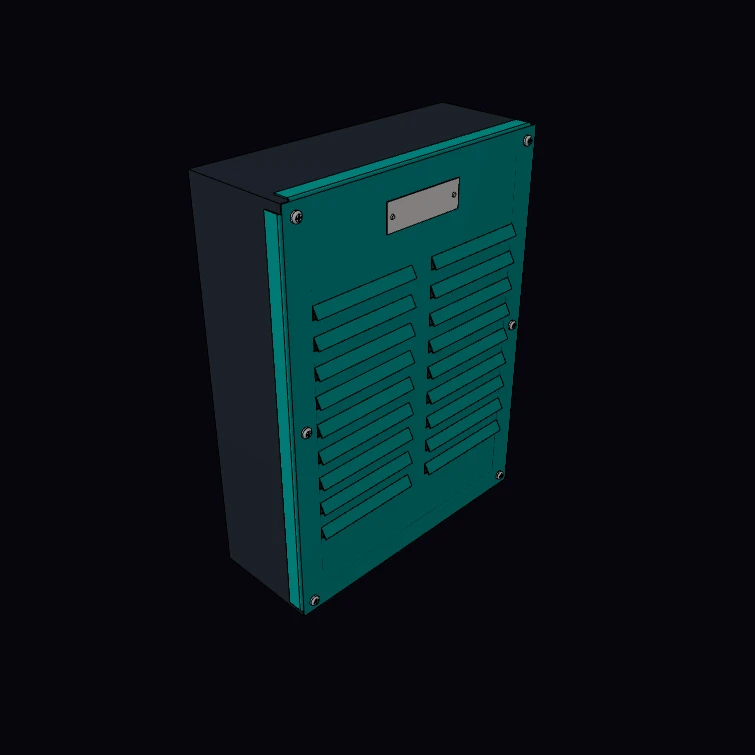 Louvered Enclosure CoverThe louvered cover of an equipment enclosure, from 20 gauge steel, with its screws, a name plate and the enclosure behind it. Each louver is a cut on three sides with the flap formed out along the fourth side, so the flat blank keeps all its material. The gauge and the screw threads are published figures. The M4 screws and the cable glands have true helical threads in tapped holes. The kernel unfolds the cover to the flat blank and measures its mass. The size, the louvers, the enclosure and the hardware are a display model. The DXF button downloads the flat blank.
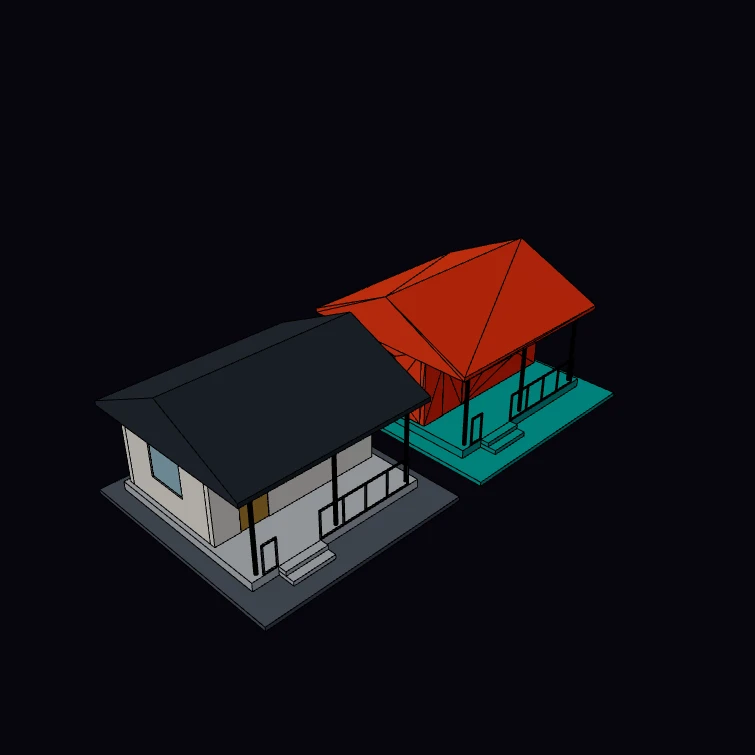 IFC Round TripExport a pavilion to IFC, read the file back with fromIfc, and show the source model and the model from the file side by side. Each solid of the second pavilion comes from the exported file, so a difference between the writer and the importer is visible. Its colour is the geometry fidelity of each element: teal for a parametric solid, orange for a mesh that the importer sewed into a solid. The console reports the fidelity counts, the GlobalIds that survived, and the largest volume difference that the kernel measures between a source body and its copy. The pavilion is a display model.
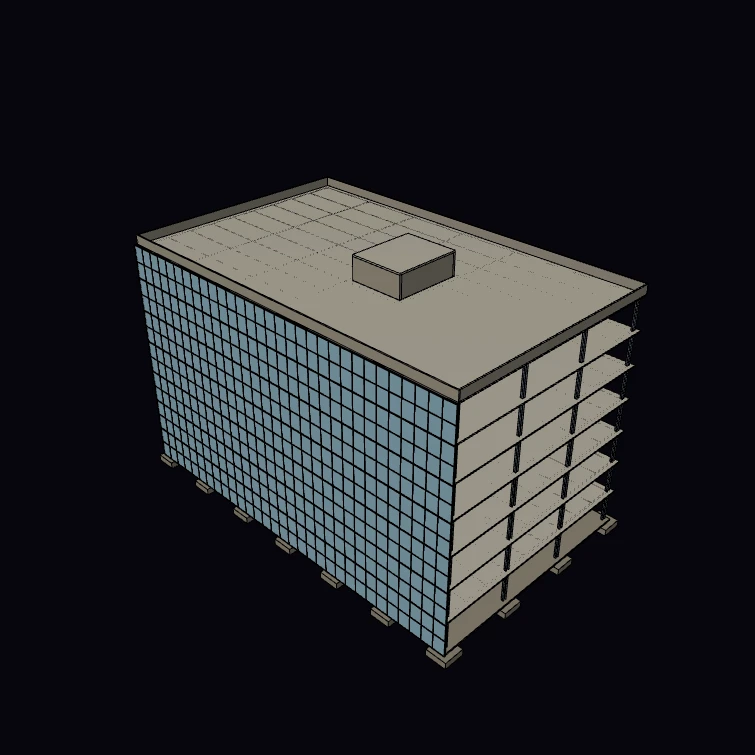 Office BuildingA steel-framed office building of seven storeys as a BIM model. Each column, beam, slab, wall, stair, door and curtain wall is a typed element in a storey, so the kernel takes off the steel and the concrete, and the Files button saves the IFC file. The steel sections, the planning grid, the storey height, the slab depth, the stair and the facade module are published figures. The core layout, the foundations and the roof are a display model.
Next steps
- Healing & Sewing: preparing imports for further operations
- Three.js Integration: render exported meshes in the browser
- Boolean Operations: operating on imported shapes (after healing)